What is AI Agent Orchestration? A Practical Guide for Developers in 2026
- Problem: Single AI agents hit capability ceilings on complex, multi-step tasks requiring diverse tools or parallel processing.
- Solution: AI agent orchestration adds a coordination layer that decomposes tasks, delegates to specialized agents, and aggregates results.
- Result: Your team gains multi-agent systems that handle complex workflows—from web research to analysis to reporting—with the coordination of a well-run team.
What is AI Agent Orchestration?
AI agent orchestration is the practice of coordinating multiple AI agents to work together on complex tasks. An orchestration layer manages agent communication, task decomposition, delegation, and result aggregation—enabling multi-agent systems to handle workflows no single agent could complete alone.
Think of orchestration like a project manager for AI agents. When a complex request arrives—like "research Company X's competitive position and draft a market entry memo"—the orchestrator breaks this into subtasks (web research, pricing analysis, market sentiment, competitive positioning, document drafting) and routes each to the appropriate specialized agent.
Without AI agent orchestration, developers must manually coordinate agent interactions, handle communication protocols, and manage result aggregation. Multi-agent orchestration has emerged as one of the key engineering challenges organizations face as they scale AI systems from prototypes to production.
The distinction between orchestration and simple agent chaining matters. A chained system follows a rigid pipeline: Agent A outputs to Agent B to Agent C. An orchestrated system makes dynamic decisions: based on intermediate results, it might route to Agent D, spawn parallel tasks, or loop back for clarification. This flexibility is what makes AI agent orchestration platforms essential for real-world workflows.
How AI Agent Orchestration Works
AI agent orchestration follows a four-phase cycle that handles the complexity of multi-agent workflows. Understanding these phases helps you design more effective orchestrated systems and debug issues when they arise.
Phase 1: Task Decomposition
The orchestrator receives a user request and breaks it into discrete subtasks. This is harder than it sounds—natural language requests are often ambiguous, contain implicit dependencies, or combine multiple objectives that should be handled differently.
For example, "generate a competitive analysis for Company X" might decompose into: fetch product features, retrieve customer reviews, analyze pricing strategy, and draft the competitive report. But the orchestrator must also decide: should these run sequentially or in parallel? Are there dependencies between them? What happens if one fails?
Effective task decomposition significantly reduces the time spent resolving orchestration issues. The decomposition phase is where most orchestration failures originate—a poorly decomposed task leads to cascading errors downstream that are expensive to debug.
Advanced orchestrators use LLM-based decomposition to handle ambiguity. They might prompt the LLM with: "Given this request, identify the subtasks, their dependencies, and potential failure modes." This adds latency but significantly improves reliability for complex requests.
Phase 2: Capability Routing
Once tasks are decomposed, the orchestrator matches each subtask to an appropriate agent. This requires understanding both the task requirements and each agent's capabilities—their tools, memory state, and areas of expertise.
Consider a multi-agent orchestration scenario for a competitive intelligence workflow. The orchestrator receives: "Research competitor X across product features, pricing, market sentiment, and technology stack." It routes: web search to a search agent, pricing data to a pricing agent, social sentiment to a social media agent, and technical analysis to a tech research agent.
The routing decision involves several factors: agent availability (is the agent currently processing another task?), capability match (does the agent have the right tools?), and state context (what does the agent already know from previous interactions?). Poor routing leads to agents working on tasks they're ill-suited for, degrading output quality.
Modern AI agent orchestration platforms like QVeris handle capability routing at scale, maintaining registries of 10,000+ capabilities across web search, maps, weather APIs, document stores, financial data, blockchain, and healthcare systems. This eliminates the need to manually wire each agent to each capability—instead, the orchestrator routes to the right tool dynamically based on task requirements.
This is where capability routing connects to tool calling at scale—instead of hardcoding every API integration, the orchestrator queries available tools and selects the best match for each subtask. This dynamic tool calling approach scales across thousands of capabilities without exploding the number of hardcoded connections.
Phase 3: Agent Delegation and Execution
The orchestrator routes each subtask to the appropriate agent and manages the execution phase. Agents may work in parallel (independent tasks like fetching data from multiple sources simultaneously) or in sequence (where one agent's output feeds another's input).
During execution, the orchestrator must handle several challenges: timeout management (what if an agent takes too long?), rate limiting (preventing API quota exhaustion), context window management (ensuring agents don't exceed their LLM context limits), and streaming responses (providing real-time feedback to users).
For parallel execution, the orchestrator dispatches tasks concurrently and waits for all to complete before proceeding. This can reduce end-to-end latency dramatically—tasks that would take 30 seconds sequentially might complete in 8 seconds when parallelized across 4 agents. The orchestrator must also handle partial failures: if 3 of 4 parallel tasks succeed, what does the orchestrator do?
Sequential execution is simpler but slower. Each agent must complete before the next starts, and the output from each agent feeds directly into the next. This pattern suits linear workflows like "fetch → clean → analyze → report" where later stages depend on earlier outputs.
Phase 4: Result Aggregation
Once agents complete their tasks, the orchestrator collects outputs, resolves conflicts, and synthesizes a final response. This is where orchestration earns its name—the orchestrator must harmonize potentially disparate outputs into a coherent whole.
Result aggregation involves several sub-tasks: validating outputs (did each agent return valid data?), resolving conflicts (if two agents disagree, which takes precedence?), formatting (translating raw outputs into user-facing format), and error handling (when an agent fails or returns unexpected results, determining retry strategies or fallback paths).
For example, if an orchestration workflow fetches data from three different sources and two report stock price as $150 while one reports $148, the aggregator might flag this discrepancy, query the source with the highest reliability rating, or flag the conflict for human review depending on the configured tolerance.
Why AI Agent Orchestration Matters
Single-agent systems hit walls on complex enterprise tasks. AI agent orchestration solves three core problems that limit the effectiveness of isolated AI agents working alone.
- Capability fragmentation: No single agent excels at everything. A research agent knows RAG and document retrieval; a coding agent handles Python; a math agent runs analysis; a writing agent produces polished output. AI agent orchestration lets each agent specialize while the system handles holistic tasks that require combining multiple capabilities.
- Manual handoff overhead: Without multi-agent orchestration, developers write custom logic to chain agents together—error handling, timeout management, result passing, context management. This glue code becomes unmaintainable at scale. Teams report that debugging orchestration issues consumes significant engineering time that could be spent on product development.
- Scaling bottlenecks: A single agent processing sequential tasks hits latency ceilings. AI agent orchestration enables parallel execution where independent tasks run simultaneously, reducing end-to-end latency from minutes to seconds. A workflow fetching data from 10 sources would take 10x the single-source latency sequentially but near-single-source latency in parallel with proper orchestration.
For teams building AI-powered workflows—whether competitive intelligence, customer service, or software development—multi-agent orchestration enables coordinated agents that retrieve data from multiple sources, run analysis, generate outputs, and trigger actions, all coordinated without custom glue code. Platforms like LangGraph and Microsoft AutoGen provide production-grade patterns for this coordination.
If your tasks are simple and single-step, orchestration adds unnecessary complexity. But for any workflow requiring 3+ distinct capabilities or parallel processing, AI agent orchestration is the architectural pattern that makes it manageable and scalable.
Types of AI Agent Orchestration
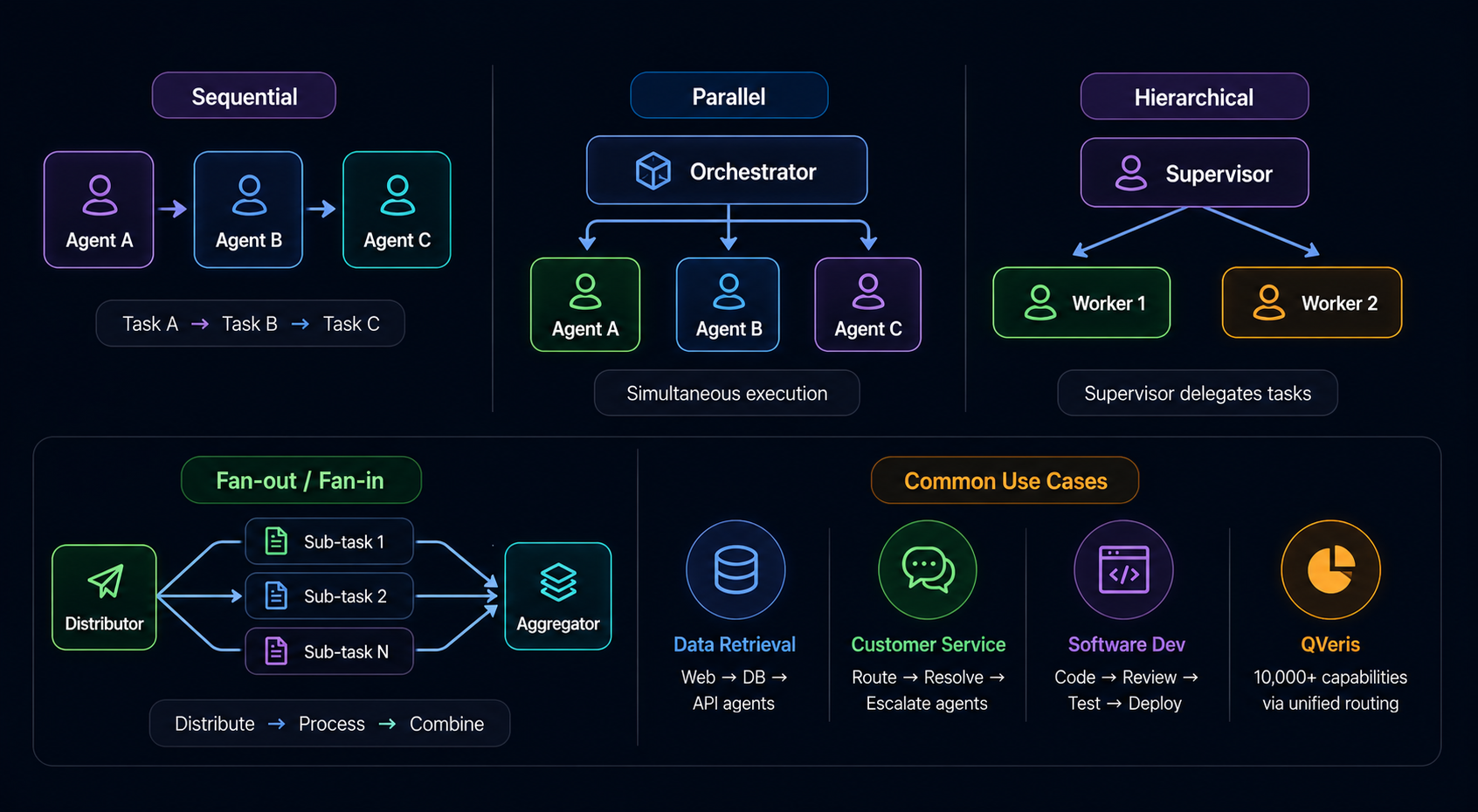
AI agent orchestration patterns fall into four categories, each suited to different workflow characteristics. Understanding these patterns helps you choose the right architecture for your specific use case.
Sequential Orchestration
Agents execute in a defined order, where each agent's output feeds directly into the next. This is the simplest pattern and mirrors traditional pipeline architectures. Best for linear workflows with strict dependencies—like "fetch data from API, clean the data, run analysis, generate report."
Best for: Linear pipelines, workflows requiring strict audit trails, document processing where each stage builds on the previous.
Limitation: Slowest pattern since tasks can't overlap. A failure at any stage stops the entire pipeline.
Parallel Orchestration
Multiple agents execute simultaneously on independent tasks. The orchestrator dispatches all tasks at once and waits for all to complete before proceeding. Best for tasks like "fetch earnings from 10 companies in parallel" where results don't depend on each other.
Best for: Bulk data retrieval, multi-source research, parallel analysis tasks, scenarios where latency matters more than sequential dependency.
Limitation: Requires all tasks to be independent. Can't handle workflows where later tasks depend on earlier outputs.
Hierarchical Orchestration
A supervisor agent delegates subtasks to worker agents, manages their execution, and synthesizes results. The supervisor makes routing decisions dynamically based on task requirements and agent availability. Best for complex tasks requiring dynamic task allocation and conditional branching.
Best for: Complex decision-making, dynamic task allocation, error recovery scenarios, workflows with conditional logic.
Limitation: The supervisor becomes a single point of failure. A poorly designed supervisor can become a bottleneck.
Fan-out/Fan-in Orchestration
One agent distributes work to many sub-agents (fan-out), then collects and aggregates their results (fan-in). This pattern is ideal for parallel analysis followed by synthesis. Best for scenarios like "analyze this document across 10 dimensions simultaneously, then synthesize findings."
Best for: Multi-dimensional analysis, comprehensive reporting, parallel expert opinions, due diligence across multiple criteria.
Limitation: The aggregator must handle conflicts and synthesize potentially contradictory outputs from sub-agents.
Most production systems combine patterns—for example, hierarchical orchestration where supervisor agents fan out tasks in parallel to maximize throughput while maintaining dynamic routing capabilities. Choosing the right AI agent orchestration platform depends on your specific pattern requirements and the flexibility needed for dynamic workflows.
Top AI Agent Orchestration Frameworks Compared
Three frameworks dominate the AI agent orchestration framework landscape in 2026. Each has distinct strengths, trade-offs, and ideal use cases. Choosing the right AI agent orchestration platform depends on your team's expertise and specific requirements.
| Aspect | LangChain / LangGraph | AutoGen | CrewAI |
|---|---|---|---|
| Orchestration Model | Flexible graph-based chains | Conversational agents | Role-based teams |
| Learning Curve | Steeper (more options) | Moderate | Gentler (opinionated) |
| Best For | Custom workflows, RAG | Multi-agent chat | Structured team tasks |
| Parallel Execution | Supported | Supported | Native support |
| Enterprise Readiness | High (extensive ecosystem) | High (Microsoft-backed) | Growing |
| Capability Routing | Custom integration needed | Custom integration needed | QVeris integration available |
LangChain / LangGraph
The most flexible option for building an AI agent orchestration platform from the ground up. LangChain provides building blocks for chains, agents, and memory—with extensive integrations for vector stores, APIs, and tools. LangGraph extends this with graph-based orchestration patterns for complex workflows with cycles, conditional branching, and state management.
The framework's extensibility is both its strength and complexity. You can build virtually any orchestration pattern, but you need to understand the primitives well. LangGraph excels for custom workflows that don't fit standard patterns—multi-turn conversations with memory, conditional routing based on LLM outputs, and long-running workflows with human-in-the-loop checkpoints.
Choose LangChain/LangGraph if: You need maximum flexibility, have complex custom workflows, or are building on top of existing LangChain infrastructure. Not ideal for teams wanting quick wins or teams without strong Python skills.
Limitations: Steep learning curve, frequent API changes (v0.1 to v0.2 broke many integrations), documentation gaps on advanced patterns.
Microsoft AutoGen
AutoGen focuses on multi-agent conversation as the orchestration mechanism. Agents communicate via messages, enabling flexible dialog patterns where agents can collaborate, debate, or critique each other's outputs. Microsoft's backing brings enterprise-grade reliability, security updates, and active development.
The conversational model is particularly powerful for tasks where agent collaboration improves outputs—a coder agent and reviewer agent debating implementation choices, or multiple specialist agents providing different perspectives on a problem. See official AutoGen documentation for getting started.
Choose AutoGen if: Your use case centers on agent-to-agent conversation, collaborative problem-solving, or you need Microsoft ecosystem integration (Azure, Copilot, Teams).
Limitations: Less flexible for non-conversational patterns, weaker ecosystem compared to LangChain, can be verbose for simple workflows.
CrewAI
CrewAI takes a team-based approach—define agents with specific roles (Researcher, Analyst, Writer), assign tasks, and let them collaborate. Its opinionated structure accelerates onboarding for teams new to AI agent orchestration, with clear mental models for how agents interact.
The role-based model maps naturally to business workflows: a Researcher fetches information, an Analyst processes it, a Writer produces the final output. This abstraction reduces cognitive load but trades flexibility for simplicity.
Choose CrewAI if: You want structured agent teams with clear role definitions, faster prototyping, or are evaluating AI agent orchestration for the first time. Great for MVPs and proof-of-concept builds.
Limitations: Less flexible for edge cases, fewer integration options than LangChain, the opinionated structure can become limiting for complex workflows.
For teams needing unified capability routing across diverse capabilities (search, weather, maps, docs, financial data, blockchain, healthcare), dedicated platforms like QVeris provide AI-agent native orchestration with built-in access to 10,000+ capabilities—removing the need for custom API integrations that these frameworks require. This approach trades framework flexibility for faster time-to-value on common orchestration patterns.
Code Example: AI Agent Orchestration with LangGraph
Here's a practical example of how to orchestrate AI agents using LangGraph. This code demonstrates a competitive intelligence workflow with parallel data retrieval and sequential analysis:
# LangGraph AI Agent Orchestration Example
# Competitive intelligence workflow with parallel + sequential patterns

from langgraph.graph import StateGraph, END
from langchain_openai import ChatOpenAI
from typing import TypedDict, List

# Define the state schema for our orchestration
class ResearchState(TypedDict):
    query: str
    company: str
    news: List[str]
     financials: List[str]
    analysis: str
    report: str

llm = ChatOpenAI(model="gpt-4o")

# Agent 1: Fetch news in parallel with Agent 2: Fetch financials
def fetch_pricing(state: ResearchState) -> ResearchState:
    # Parallel retrieval - could fetch from multiple sources simultaneously
    pricing_data = f"Pricing analysis for {state['company']}: ..."
    return {"news": [pricing_data]}

def fetch_technical(state: ResearchState) -> ResearchState:
    # Parallel retrieval - fetches tech stack, integrations, reviews
    technical_data = f"Technical analysis for {state['company']}: ..."
    return {"financials": [technical_data]}

# Agent 3: Analyze combined data (waits for both parallel tasks)
def analyze_data(state: ResearchState) -> ResearchState:
    prompt = f"Analyze: News={state['news']}, Financials={state['financials']}"
    analysis = llm.invoke(prompt)
    return {"analysis": analysis.content}

# Agent 4: Generate final report
def generate_report(state: ResearchState) -> ResearchState:
    prompt = f"Write report based on: {state['analysis']}"
    report = llm.invoke(prompt)
    return {"report": report.content}

# Build the AI agent orchestration graph
graph = StateGraph(ResearchState)
graph.add_node("fetch_pricing", fetch_pricing)
graph.add_node("fetch_technical", fetch_technical)
graph.add_node("analyze", analyze_data)
graph.add_node("report", generate_report)

# Define orchestration flow: parallel -> sequential
graph.add_edge("fetch_pricing", "analyze")
graph.add_edge("fetch_technical", "analyze")
graph.add_edge("analyze", "report")
graph.add_edge("report", END)

# Compile and execute the orchestrated workflow
app = graph.compile()
result = app.invoke({
    "query": "Competitive analysis",
    "company": "Competitor X",
    "news": [],
    "financials": [],
    "analysis": "",
    "report": ""
})

print(result["report"])
This example demonstrates key AI agent orchestration principles: parallel data fetching (news and financials simultaneously), sequential processing (analysis depends on both fetches completing), and state management across agents. The pattern extends to any workflow requiring coordinated multi-agent execution.
Production Pitfalls and How to Avoid Them
Moving from prototype to production with AI agent orchestration reveals challenges that don't appear in demos. Based on patterns observed across enterprise deployments, here are the most common pitfalls and how to address them.
Debugging Opacity
When a multi-agent workflow fails in production, understanding why is difficult. An agent might receive corrupted context, hit an API rate limit silently, or return malformed output that breaks the downstream agent. Without observability, you're debugging blind.
Solution: Implement structured logging at each orchestration boundary. Log the input to each agent, the agent's output, and the time taken. Use correlation IDs to trace requests across agent boundaries. Consider tools like LangSmith, Weights & Biases, or custom dashboards that visualize agent execution traces.
Token Cost Escalation
Multi-agent workflows consume tokens at multiple stages: each agent's prompt, each agent's context (which may include previous agent outputs), and each agent's response. A workflow that seems inexpensive at prototype scale can become costly at production volumes.
Solution: Profile token consumption early. Implement context pruning—truncate or summarize agent outputs before passing to downstream agents. Set budget alerts and implement circuit breakers that halt expensive workflows when costs exceed thresholds.
Cascading Failures
When one agent fails in a sequential orchestration, the entire workflow fails unless you handle it explicitly. In parallel orchestration, partial failures leave the workflow in an inconsistent state.
Solution: Design for failure. Define retry policies with exponential backoff for transient failures. Implement fallback paths—what should the workflow do if a data source is unavailable? For parallel workflows, decide whether partial success is acceptable and how to handle missing outputs.
Context Window Contention
As orchestration complexity grows, context windows fill up. An agent receiving verbose outputs from multiple previous agents might exceed its context limit, leading to truncated inputs or failed generations.
Solution: Implement aggressive context management. Summarize agent outputs before passing to downstream agents. Use separate context windows for different agent types. Monitor context utilization and alert when approaching limits.
Latency Variance
LLM responses vary in latency based on load, model版本, and output length. In parallel orchestration, the slowest agent determines total latency. In sequential orchestration, latency compounds.
Solution: Implement timeout policies for each agent. Use streaming responses to provide early feedback to users. Consider asynchronous orchestration where users receive immediate acknowledgment and webhook notifications when results are ready.
Building a robust AI agent orchestration platform for production requires addressing these pitfalls systematically. Platforms like QVeris handle many of these concerns out-of-the-box—observability, cost management, failure handling—but understanding these challenges helps you design better workflows regardless of your chosen AI agent orchestration framework.
When to Use AI Agent Orchestration (and When Not To)
Complex workflows requiring 3+ distinct capabilities
Tasks that can be parallelized for speed
Multi-source data aggregation and synthesis
Enterprise processes with error handling needs
Scenarios requiring agent specialization
Long-running workflows with checkpoints
Simple single-step tasks (one agent suffices)
Low-latency requirements where orchestration overhead matters
Teams without orchestration framework experience
Prototyping where speed trumps scalability
Cost-sensitive applications with fixed budgets
Highly regulated contexts with strict audit requirements
A practical rule: if the workflow can be described in one sentence and handled by one agent with access to the right tools, AI agent orchestration adds complexity without benefit. If the workflow spans multiple domains (data + analysis + writing + action) or requires handling failures gracefully, orchestration is the right architecture.
AI Agent Orchestration vs Agent Frameworks
These terms are often used interchangeably, but they describe different layers of the AI agent stack. Understanding the distinction helps you choose the right tools and architecture for your use case.
- Agent frameworks (LangGraph, LlamaIndex, CrewAI core): Provide the building blocks for individual agents—memory management, tool use, prompt templating, and agent primitives. Think of these as the agent SDK. They answer: "How do I build a single capable agent?"
- AI agent orchestration: Adds the coordination layer that manages multiple agents, their communication patterns, and workflow sequencing. The orchestrator decides which agent handles which task and how results flow between them. It answers: "How do I coordinate multiple agents working together?"
The distinction matters when evaluating tools. CrewAI, for example, provides both agent primitives (framework) and team orchestration (multi-agent coordination) in one package. LangChain provides flexible primitives that can be composed into orchestration patterns—but the orchestration logic is your responsibility. AutoGen focuses on conversational orchestration, making it ideal for collaborative agent scenarios.
Beyond frameworks, dedicated AI agent orchestration platforms like QVeris take a different approach: they handle capability routing at scale, providing unified access to 10,000+ tools (search, weather, maps, docs, financial data, blockchain, healthcare) without custom integration work. Rather than building orchestration from primitives, you define workflows and the platform handles agent coordination and tool routing.
For teams exploring general-purpose orchestration, the choice between agent framework and orchestration platform depends on your needs: frameworks give you maximum flexibility to build custom logic; orchestration platforms accelerate development by handling tool routing and coordination out of the box. The right AI agent orchestration platform depends on your team's expertise, timeline, and specific workflow requirements.
Build AI Agents with Native Capability Routing
QVeris provides AI-agent native orchestration—coordinated agents with unified access to 10,000+ capabilities across search, maps, docs, financial data, blockchain, healthcare, and more.
Start Building Free →How to Orchestrate AI Agents: A Step-by-Step Guide
Getting started with AI agent orchestration requires understanding both the technical implementation and the workflow design. Here's a practical approach for developers building their first orchestrated multi-agent system.
Before writing code, map out the tasks your workflow requires. Identify: which tasks can run in parallel, which have sequential dependencies, what tools each agent needs, and where error handling matters. A clear task decomposition and agent topology is the foundation of effective AI agent orchestration. Document the expected inputs and outputs for each agent, and identify where data transformations are needed between agents.
Consider the orchestration pattern: does your workflow fit sequential, parallel, hierarchical, or fan-out/fan-in? Many production workflows combine patterns. Start simple—begin with sequential orchestration and add parallelism only where it demonstrably improves performance.
Match your workflow to an orchestration pattern—sequential for linear pipelines, parallel for independent tasks, hierarchical for complex delegation, fan-out/fan-in for multi-dimensional analysis. Then select your tools: LangGraph for flexibility, AutoGen for conversational patterns, CrewAI for rapid prototyping, or a platform like QVeris for out-of-the-box capability routing.
For teams new to AI agent orchestration, start with CrewAI's opinionated structure. As you encounter its limitations, migrate to LangGraph for more control. Reserve custom-built orchestration for truly unique workflows that no framework addresses.
Implement your agents and orchestration logic, but build observability from the start. Log agent inputs/outputs, track token consumption, and measure latency at each orchestration boundary. Deploy to production incrementally—start with a subset of traffic, monitor error rates, and scale up as confidence builds.
AI agent orchestration is inherently experimental. Expect to iterate on agent definitions, prompt engineering, and orchestration logic based on production feedback. The teams that succeed treat their first production deployment as a starting point, not a finished product.