MCP Registry: How to Discover and Publish MCP Servers in 2026
- What: The MCP Registry is the official metadata repository for Model Context Protocol servers, launched in preview September 2025 and now hosting nearly 2,000 servers.
- Use: Discover publicly available MCP servers to extend your AI models, or publish your own server to share tools with the community.
- Scale: Sub-registries like QVeris add capability routing on top of the registry, enabling AI agents to automatically find and connect to the right tools across 10,000+ capabilities.
What Is the MCP Registry?
The MCP Registry is the official metadata repository for publicly accessible Model Context Protocol servers. It provides a centralized directory where developers can discover, publish, and share MCP servers that extend AI model capabilities through standardized tool definitions and function calling interfaces.
The MCP Registry addresses a fundamental problem in AI agent development: finding and integrating external tools. Without a registry, developers must manually search GitHub, read documentation, and write custom integration code for each tool they want to use. The MCP Registry standardizes this process through the Model Context Protocol, making tools discoverable and interoperable across different AI frameworks.
Think of the MCP Registry as the npm registry for AI agent tools — just as npm hosts JavaScript packages that developers can install with a single command, the MCP Registry hosts tool servers that AI agents can discover and connect to through standardized interfaces. This analogy extends to governance: npm is maintained by the JavaScript ecosystem, while the MCP Registry is maintained by the Agentic AI Foundation under the Linux Foundation umbrella.
The distinction between the official MCP Registry and broader MCP server directories matters. The registry provides authoritative metadata — server names, versions, capability descriptions — but doesn't solve the discovery problem entirely. Finding "which server handles stock price lookups" requires scanning through descriptions. Sub-registries like QVeris layer capability routing on top, enabling semantic search and automatic tool selection.
How the MCP Server Directory Works
The MCP Registry operates through a combination of governance structure, metadata schema, and trusted reviewer workflow. Understanding these components helps you navigate the registry effectively and publish compliant servers.
Governance: From Anthropic to Linux Foundation
The Model Context Protocol was originally developed by Anthropic and open-sourced in late 2024. In September 2025, the registry launched in preview with Anthropic, GitHub, and Microsoft as founding trusted contributors. In December 2025, the Linux Foundation's Agentic AI Foundation took over governance, ensuring the protocol remains vendor-neutral and community-driven. Anthropic documented the donation in their official announcement, providing transparency on the transition.
The server.json Schema
Every MCP server published to the registry requires a server.json manifest file that defines the server's metadata, capabilities, and tool interface. This schema is the contract between servers and clients.
// server.json - MCP Server Manifest Example
{
  "name": "stock-price-lookup",
  "version": "1.0.0",
  "description": "Real-time stock price and market data lookup",
  "capabilities": {
    "tools": [
      {
        "name": "get_stock_price",
        "description": "Get current stock price for a given symbol",
        "inputSchema": {
          "type": "object",
          "properties": {
            "symbol": {
              "type": "string",
              "description": "Stock ticker symbol (e.g., AAPL, GOOGL)"
            }
          },
          "required": ["symbol"]
        }
      }
    ],
    "resources": [
      {
        "uri": "market://indices",
        "description": "Market indices summary"
      }
    ]
  },
  "auth": {
    "type": "api_key",
    "required": true
  },
  "maintainer": {
    "name": "DataCorp Inc",
    "url": "https://datacorp.example"
  }
}
The schema defines three core capability types: tools (executable functions the agent can call), resources (structured data the agent can read), and prompts (pre-defined prompt templates). Each tool includes an inputSchema that describes required and optional parameters — this is what enables type-safe function calling across different frameworks.
Trusted Reviewer Workflow
To maintain quality, servers submitted to the official MCP Registry undergo review by trusted contributors. Reviewers verify that the server.json schema is valid, the server actually implements the declared capabilities, and the server doesn't exhibit malicious behavior. This gatekeeping prevents the registry from becoming a malware distribution vector.
Community directories like Smithery and Glama operate with looser standards — they index servers from the registry plus additional GitHub-sourced servers, trading strict review for broader coverage. Sub-registries like QVeris add their own curation layer, testing servers for reliability before including them in the capability routing index.
How to Use the MCP Registry: Discover and Publish
The MCP Registry supports two workflows: discovering existing servers for your AI agent, and publishing your own servers to share with the community. Here's how to do both.
Discovering MCP Servers
There are three paths for discovering MCP servers, each suited to different needs:
Path 1: Official Registry Browser
Visit registry.modelcontextprotocol.io to browse the official directory. You can search by keyword, filter by capability category, and view detailed server pages with metadata, tool definitions, and maintainer information. MCP servers expose tool calling interfaces that AI agents use to execute functions — each server.json schema documents these interfaces for framework integration.
Path 2: Community Directories
Community directories like Smithery.ai and Glama.ai offer better discovery UX — advanced search filters, user reviews, popularity metrics, and GitHub star counts. These directories index servers from the official registry plus additional sources, providing broader coverage at the cost of lower curation standards.
Path 3: QVeris CLI (30-Second Setup)
For AI agent integration, use the QVeris CLI to discover and install capabilities directly. Once you find a relevant MCP server, your agent calls its tools through standardized tool calling interfaces — the same pattern used across all MCP-compatible clients. QVeris maintains a curated index of 10,000+ capabilities across the MCP ecosystem:
# Install QVeris CLI
npm install -g qveris-cli

# Discover available capabilities
qveris discover --query "stock price financial data"
# Output:
# Found 3 matching capabilities:
#   1. stock-price-lookup (QVeris native)
#   2. market-data-api (MCP Registry)
#   3. crypto-prices (MCP Registry)

# Install a capability
qveris install stock-price-lookup

# Use in your agent
import { QVerisClient } from 'qveris-sdk';
const client = new QVerisClient();
await client.connect('stock-price-lookup');
const price = await client.call('get_stock_price', { symbol: 'AAPL' });
The QVeris approach differs from manual registry browsing because it handles capability routing — instead of reading server schemas manually, you describe what you want to accomplish, and QVeris finds the right tools automatically. This scales across thousands of capabilities without exploding the number of manual integrations.
How to Publish Your MCP Server: Step-by-Step
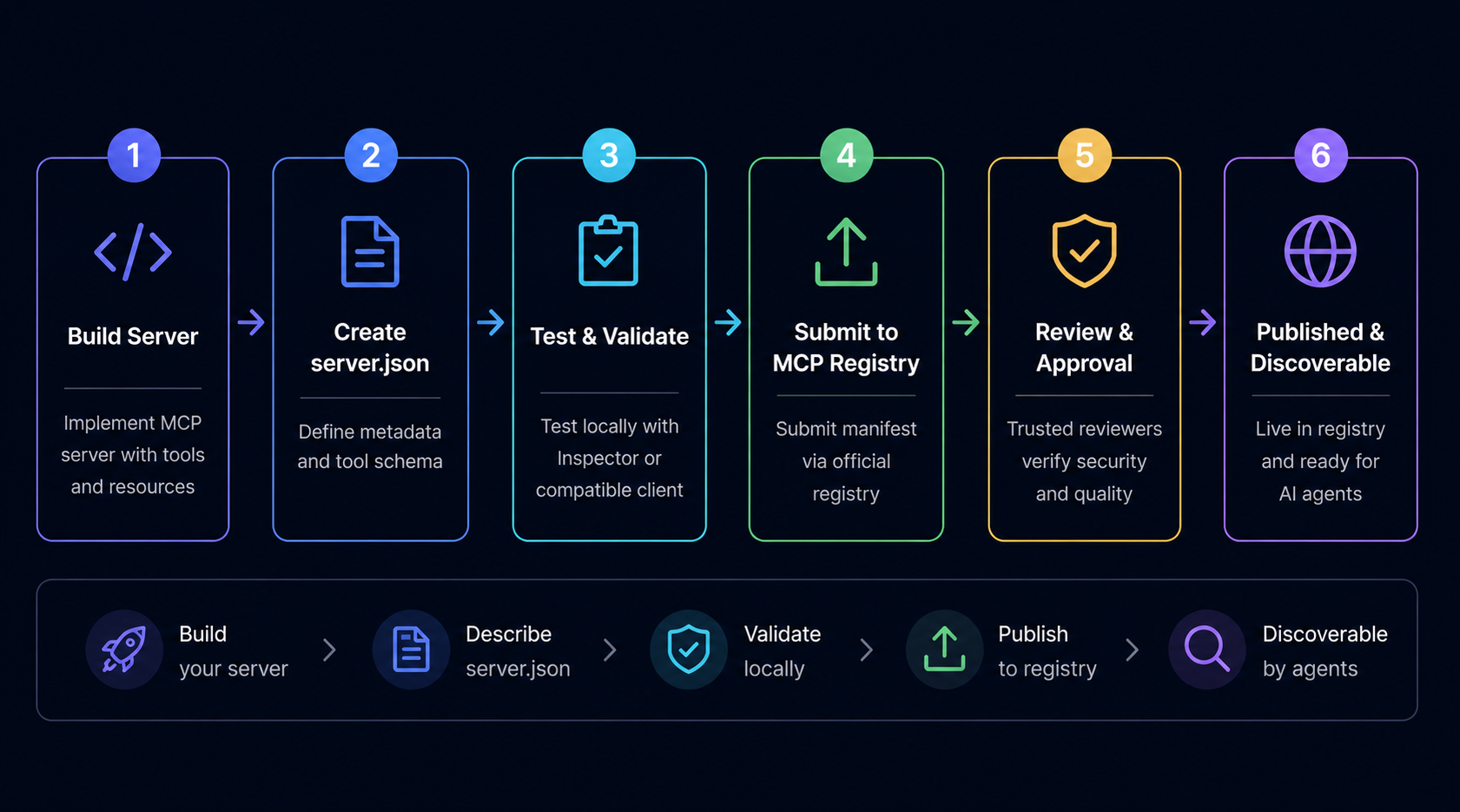
How to publish your MCP server to the official registry involves creating a compliant manifest, implementing your server, and submitting for trusted reviewer approval. Here's the complete process:
Define your server's metadata, name, version, capabilities, and tool definitions following the official schema. Ensure every tool has a valid inputSchema — this is required for the registry.
Build your server using an MCP SDK (available for Python, TypeScript, Go). Implement the tool handlers that your server.json declares. Test locally with the MCP inspector tool.
Submit your server via the registry's CLI tool or web interface. Trusted reviewers (Anthropic, GitHub, Microsoft, or community reviewers) verify schema validity and capability implementation.
Once approved, your server appears in the registry. Keep your server.json updated with new versions, and monitor for user feedback on community directories.
The publish workflow is more involved than simply uploading code — the schema validation and reviewer process ensure that registry users encounter reliable, well-documented servers. Expect 1-3 days for initial review, longer for complex servers with extensive tool definitions.
MCP Registry vs Sub-Registries: When to Use Which
The MCP Registry and sub-registries serve different purposes in the AI agent tool ecosystem. Understanding the distinction helps you choose the right approach for your use case.
You want authoritative metadata from primary source
You're manually browsing available servers
You're publishing your own server
You need to verify server provenance and trust level
You're building registry integration tooling
You want AI agents to auto-discover tools
You need semantic search across 10,000+ capabilities
You want curated, tested servers
You're building agentic workflows
Manual registry browsing is too slow
The Architecture Distinction
The official MCP Registry is a metadata repository — it stores server manifests (server.json files) and makes them discoverable. When you browse the registry, you see: server names, descriptions, capability lists, and maintainer information. This is analogous to an npm package index.
Sub-registries like QVeris are capability routing layers — they ingest registry metadata, enrich it with additional testing and documentation, and provide interfaces that AI agents can query directly. Instead of "which servers exist?" you can ask "which server handles my specific task?" and get an answer without reading through dozens of schema files.
Think of it as the difference between a phone book and a personal assistant. A phone book (registry) lists every phone number in town. A personal assistant (sub-registry) knows which number to call for any situation. For human-scale browsing, the phone book suffices. For AI agent-scale tool selection across thousands of capabilities, you need capability routing.
Which Should You Use?
Use the official registry if you're evaluating MCP as a technology, publishing a server, or doing one-time integrations. Use a sub-registry like QVeris if you're building AI agent applications that need to discover and integrate tools dynamically at runtime.
For many teams, the answer is both: use the registry for initial discovery and validation, then integrate via QVeris for production agent workflows. This gives you the best of both worlds — authoritative source of truth plus production-grade capability routing.
Top MCP Server Directories Compared
Several tools help you discover and integrate MCP servers. Here's how the main options stack up:
| Feature | Official Registry | Smithery.ai | Glama.ai | QVeris |
|---|---|---|---|---|
| Source | Official (Linux Foundation) | Registry + GitHub | Registry + GitHub | Registry + curated |
| Server Count | ~2,000 | ~3,000 | ~2,500 | 10,000+ |
| Curation | Trusted reviewers | Community | Community | Tested + verified |
| Discovery UX | Basic | Advanced filters | Reviews + metrics | Semantic search |
| Agent Integration | Manual | SDK required | SDK required | Native (CLI + SDK) |
| Capability Routing | No | No | No | Yes |
| Publishing Support | Yes | Limited | Limited | Via registry |
Choose the official registry for publishing your servers or when you need authoritative metadata. Choose Smithery or Glama for better discovery UX when browsing available tools. Choose QVeris when you need AI agents to discover and integrate tools automatically without manual schema inspection.
How We Evaluated These Directories
We evaluated these MCP server directories across six dimensions based on production requirements. Source authority: We verified whether directories source from the official registry, GitHub, or other sources — authoritative sources reduce the risk of including unverified or malicious servers. Server count: We counted unique, actively maintained servers as of Q2 2026, excluding deprecated or duplicate entries. Curation standards: We reviewed the submission and review process for each directory, distinguishing between trusted-reviewer-gated registries and open community submissions. Discovery UX: We tested search relevance, filter accuracy, and metadata completeness for common queries like "financial data" and "web search." Agent integration: We implemented a simple agent workflow (discover → install → call a tool) with each directory's SDK to measure integration friction. Capability routing: We tested whether directories support semantic search — querying by task description rather than exact tool name — which is essential for agents discovering tools without prior knowledge.
The comparison reflects our experience integrating these directories as of May 2026. The MCP ecosystem evolves rapidly; server counts, curation standards, and feature availability change monthly. We recommend testing the specific capabilities you need directly rather than relying solely on aggregate metrics.
Production Evaluation: Three Questions to Ask
When evaluating MCP servers for production use, experienced teams ask three key questions. First: Does the server expose stable tool calling interfaces? Check the server.json inputSchema for completeness — servers with missing parameter documentation often require more integration debugging. Second: Does the maintainer provide SLA commitments? Community servers may disappear or break without notice; servers with active maintainers and versioned releases are safer for production. Third: Can the server handle concurrent requests? Some MCP servers aren't designed for high-throughput scenarios — if your agent makes 100 tool calls per minute, test for rate limit errors before committing.
For teams evaluating MCP as infrastructure, the evaluation framework matters more than the specific server count. A small registry of well-documented, actively maintained servers outperforms a large registry of stale or broken implementations. QVeris applies these criteria internally, testing servers before including them in the capability routing index — this curation layer adds friction to publishing but reduces production incidents.
Discover MCP Capabilities with QVeris
QVeris provides AI-agent native capability routing across 10,000+ MCP capabilities. No manual schema inspection — just describe what you need and QVeris finds the right tools.
Start Discovering →