Function Calling: How LLMs Take Actions Across OpenAI, Anthropic & Google
- Problem: LLMs are trained on static data — they cannot fetch real-time information, query databases, or execute actions without an explicit mechanism to call external tools via structured JSON.
- Solution: Tool calling (also called function calling in OpenAI and Google's terminology, or tool use in Anthropic's) lets LLMs output structured JSON that your application executes, then incorporate the results into their response.
- Result: You gain AI systems that interact with live data and real-world services — from weather APIs to database queries to enterprise workflows — with provider choice preserved through the MCP standard.
What Is Function Calling in LLMs?
Function calling is a mechanism that lets large language models invoke external tools by outputting structured JSON. When an LLM determines a query requires action, it generates a tool_call with the function name and arguments, which the host application executes before returning results for the LLM to formulate a response.
OpenAI introduced function calling in June 2023, and the pattern rapidly became a standard feature across major LLM providers. By 2026, OpenAI, Anthropic, and Google Gemini all support some variant of this mechanism — though each uses different terminology and schema structures.
The mechanism transforms LLMs from passive text generators into active participants in workflows. Instead of hallucinating facts, the model can say "I need to check your database" and generate a properly formatted query your system executes.
How Function Calling Works: The 4-Stage Flow
Function calling follows a predictable four-stage cycle. Understanding this flow helps you debug issues and design more reliable systems.
Stage 1: User Request
Your application sends a user query to the LLM along with your tool definitions. The LLM analyzes whether the query requires tool execution or can be answered from training data.
Stage 2: LLM Decision + Tool Call Output
If the LLM determines a tool is needed, it outputs a structured tool_call message (or tool_use in Anthropic's format) containing the function name and arguments as JSON.
Stage 3: Application Execution
Your application receives the tool call, parses the function name and arguments, executes the actual function (API call, database query, file read, etc.), and captures the result.
Stage 4: Result Return + Response Synthesis
You return the tool result to the LLM as a tool message. The LLM incorporates this data to synthesize a natural language response that references the actual results.
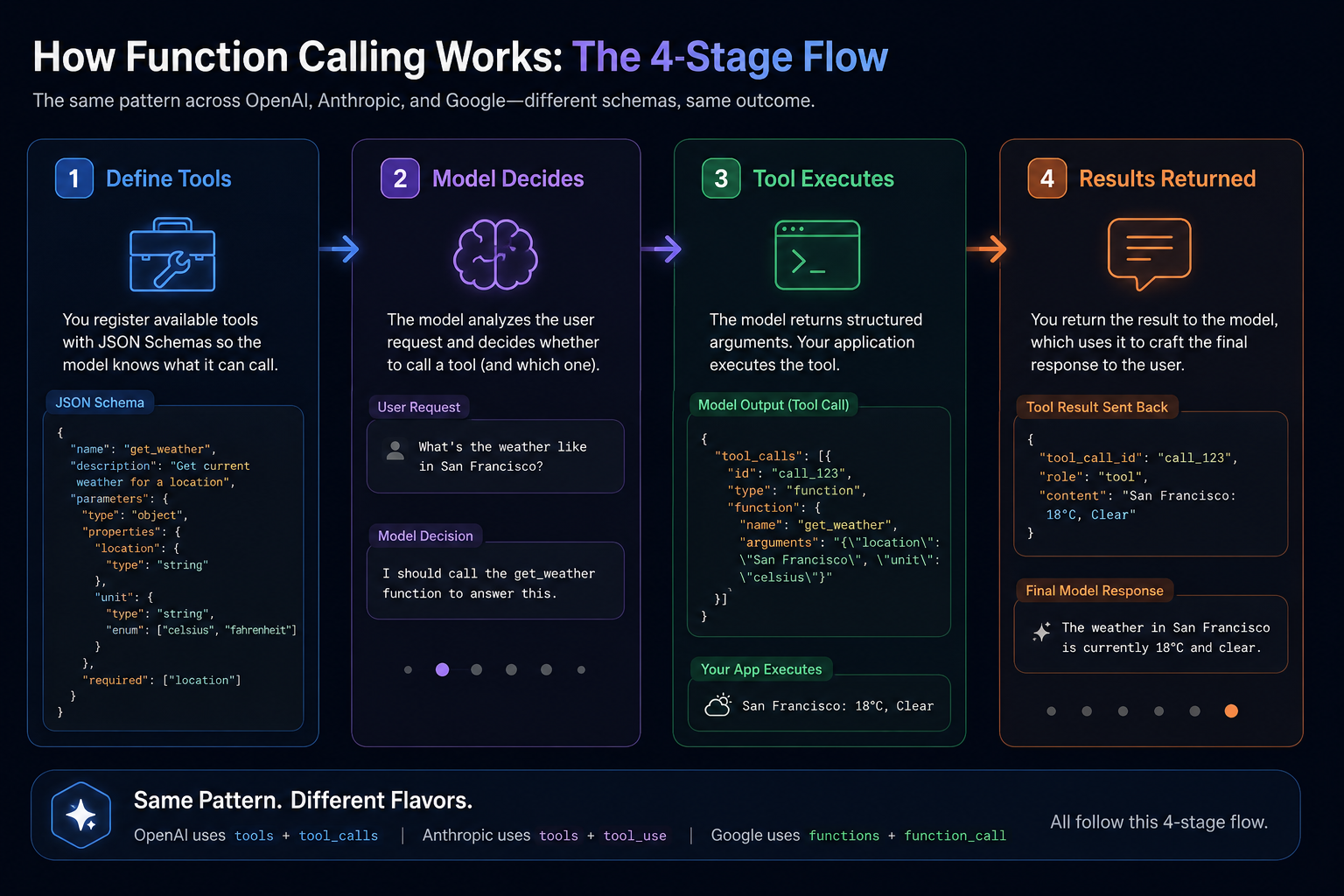
This architecture enables a key capability: MCP tools registered via the Model Context Protocol work within this same flow, letting you scale from a handful of tools to thousands without changing your integration code.
OpenAI vs Anthropic vs Google: API Schema Compared
Each LLM provider uses different field names and structural conventions for function calling. The table below compares the key differences in how each vendor handles the same conceptual operation: enabling an LLM to call an external tool.
Understanding these differences matters for two practical reasons. First, if you're building a multi-provider integration or planning to switch vendors, you'll need to adapt your tool definition format and response parsing logic. Second, if you're debugging why a particular tool calling request fails, knowing which provider's conventions apply helps you identify whether the issue is in schema definition, response parsing, or model behavior.
| Dimension | OpenAI | Anthropic Claude | Google Gemini |
|---|---|---|---|
| Terminology | Function calling | Tool use | Function calling |
| Request field | tools array |
tools array |
function_declarations |
| Response field | tool_calls |
tool_use in content |
function_call |
| Schema definition | parameters (JSON Schema) |
input_schema (JSON Schema) |
parameters (OpenAPI-style) |
| Arguments format | JSON string | Dictionary/object | Dictionary/object |
| Parallel calls | Supported | Supported | Supported |
| Tool choice control | tool_choice (auto/none/required) |
Automatic via Tool Search | Automatic via function calling |
| Large tool registry | Manual filtering needed | Lazy-loading via Tool Search | Manual filtering needed |
| Reliability score | 6.3/10 | 8.4/10 | 7.9/10 |
According to DigitalApplied's Q1 2026 benchmark, Anthropic Claude achieves 8.4/10 reliability on function calling tasks, compared to 7.9/10 for Google Gemini and 6.3/10 for OpenAI. The reliability metric measures three dimensions: correct function identification (which function to call), argument parsing accuracy (extracting correct parameters), and schema compliance (producing valid JSON). Anthropic leads due to their structured input_schema approach, which provides clearer constraints for the model, and their built-in lazy-loading via Tool Search for handling large tool registries.
Detailed field mapping
The table above shows high-level differences, but the practical implementation varies in subtle ways that matter when you're writing code. Let's walk through each dimension in detail.
Terminology and conceptual framing
OpenAI and Google both use the term "function calling," while Anthropic refers to the same capability as "tool use." This isn't just a naming difference — it reflects underlying design philosophy. Anthropic's "tool" framing suggests a broader ecosystem that includes capabilities beyond simple function invocations, such as their computer use and web search features. When you're searching documentation or community discussions, using the right term for each provider saves time.
Schema definition structure
Both OpenAI and Google use parameters for schema definition, while Anthropic uses input_schema. The semantics are identical — both accept JSON Schema objects defining the expected arguments — but the field name differs. If you're building a schema translator that adapts between providers, this is one of the key conversion points. The JSON Schema structure itself (type, properties, required) is consistent across all three providers.
Response argument format
This is where the practical difference is most noticeable. OpenAI returns arguments as a JSON string (you need to parse it with JSON.parse() or equivalent), while Anthropic and Google return arguments as native dictionaries or objects. In Python, this means Anthropic's block.input and Google's part.function_call.args are already the right Python type, while OpenAI's tool_call.function.arguments requires an additional parsing step.
Tool choice control
OpenAI exposes a tool_choice parameter with three modes: auto (let the model decide), none (prevent tool calls), and required (force a tool call). Anthropic handles this differently through their Tool Search feature, which performs lazy-loading to reduce token overhead when you have large tool registries. Google defaults to automatic behavior but provides configuration options through their function calling settings.
Provider-specific nuances worth knowing
Beyond the table, each provider has behaviors that aren't immediately obvious from documentation but significantly impact reliability and performance.
OpenAI quirks: The tool_choice: "required" mode is powerful but often overused. It forces the model to call a tool even when the user query could be answered from training data — adding unnecessary latency and potential for incorrect function calls. Reserve it for scenarios where you genuinely need tool execution regardless of context. Also note that OpenAI's function calling works differently between their Chat Completions API and their Assistants API; the two have diverged significantly, and the Assistants API is being deprecated in mid-2026.
Anthropic advantages: The Tool Search feature is underappreciated. When you register hundreds or thousands of tools, Anthropic doesn't send all of them to the model in every request. Instead, it uses an internal search mechanism to identify relevant tools based on the user's query, sending only the subset to the model. This dramatically reduces token overhead — critical for cost-sensitive applications. The tradeoff is slightly more latency on the first request as Anthropic performs the search, but the overall cost savings usually justify it.
Google's approach: Gemini's function calling is integrated with their broader tool ecosystem. The function_declarations field can contain multiple function definitions, and Gemini handles parallel calls efficiently. Google's approach tends to work well with their strengths in handling structured outputs, and the arguments come back as native Python dictionaries without the JSON string parsing step required by OpenAI's tool calling responses.
Capability routing considerations
When deploying tool calling across multiple providers, capability routing becomes essential. Different providers handle edge cases differently: OpenAI's tool calling may produce malformed JSON in edge cases, Anthropic's tool use has better schema validation, and Google's function calling handles nested structures well. Understanding these differences lets you implement proper capability routing — directing tool calling requests to the provider best suited for each specific use case based on schema complexity, reliability requirements, and cost constraints.
The semantic similarity across providers means you can abstract the integration layer. This is exactly what the MCP tools ecosystem enables — write once, use across any provider that supports tool calling without per-provider modifications.
Provider Code Examples
OpenAI (click to expand)
# OpenAI function calling example
from openai import OpenAI

client = OpenAI()

tools = [
    {
        "type": "function",
        "function": {
            "name": "get_weather",
            "description": "Get current weather for a location",
            "parameters": {
                "type": "object",
                "properties": {
                    "location": {"type": "string"},
                    "unit": {"type": "string", "enum": ["celsius", "fahrenheit"]}
                },
                "required": ["location"]
            }
        }
    }
]

response = client.chat.completions.create(
    model="gpt-4o",
    messages=[{"role": "user", "content": "What's the weather in Tokyo?"}],
    tools=tools,
    tool_choice="auto"
)

# Response contains: response.choices[0].message.tool_calls
tool_call = response.choices[0].message.tool_calls[0]
print(tool_call.function.name)  # "get_weather"
print(tool_call.function.arguments)  # '{"location": "Tokyo"}'
Anthropic Claude (click to expand)
# Anthropic tool use example
from anthropic import Anthropic

client = Anthropic()

tools = [
    {
        "name": "get_weather",
        "description": "Get current weather for a location",
        "input_schema": {
            "type": "object",
            "properties": {
                "location": {"type": "string"},
                "unit": {"type": "string", "enum": ["celsius", "fahrenheit"]}
            },
            "required": ["location"]
        }
    }
]

response = client.messages.create(
    model="claude-sonnet-4-20250514",
    max_tokens=1024,
    messages=[{"role": "user", "content": "What's the weather in Tokyo?"}],
    tools=tools
)

# Response contains tool_use in content blocks
for block in response.content:
    if block.type == "tool_use":
        print(block.name)  # "get_weather"
        print(block.input)  # {"location": "Tokyo"} (dict, not JSON string)
Google Gemini (click to expand)
# Google Gemini function declarations example
import google.generativeai as genai

genai.configure(api_key="your-api-key")

model = genai.GenerativeModel("gemini-2.0-flash")

tools = [
    {
        "function_declarations": [
            {
                "name": "get_weather",
                "description": "Get current weather for a location",
                "parameters": {
                    "type": "object",
                    "properties": {
                        "location": {"type": "string"},
                        "unit": {"type": "string"}
                    }
                }
            }
        ]
    }
]

response = model.generate_content(
    "What's the weather in Tokyo?",
    tools=tools
)

# Response contains function_call parts
for part in response.candidates[0].content.parts:
    if hasattr(part, "function_call"):
        print(part.function_call.name)  # "get_weather"
        print(part.function_call.args)  # {"location": "Tokyo"}
If you want a unified approach that abstracts these differences, consider using an
When to Use Function Calling (and When Not To)
Tool calling adds capability but also latency and complexity. Use it judiciously — understanding when the tradeoffs favor function calling versus when they don't is essential for building reliable systems.
The decision framework isn't binary. The right choice depends on your specific requirements for latency, accuracy, cost, and user experience. A customer-facing chatbot has different constraints than an internal data processing pipeline, even if both use tool calling.
Good fit for tool calling:
- Real-time data needs: Stock prices, weather, inventory levels, order status — anything that changes frequently and where stale data produces wrong answers. The moment your users need information that's not in training data, tool calling becomes relevant.
- Database queries: Customer lookups, transaction history, product catalog searches, account balance checks. Database queries are tool calling's strongest use case because the data is always current, the schema is well-defined, and the functions are deterministic.
- External API integrations: Payment processing, shipping rates, calendar scheduling, travel booking. These are natural function calling targets because they involve external systems with stable, documented APIs.
- Action-oriented workflows: Sending emails, updating records, triggering webhooks, executing transactions. Any operation where the user wants something done rather than just known benefits from tool calling.
- Multi-step reasoning: Tasks requiring sequential tool calls where each result informs the next step. A research agent that needs to gather information from multiple sources, or a planning system that must query status before deciding on next actions, depends on tool calling for reliable operation.
Bad fit for function calling:
- Simple factual questions: "What is photosynthesis?" or "Who was the first president?" — no external data needed, adding tool overhead increases latency without any benefit. The LLM's training data already contains the answer.
- Token-constrained environments: Each tool call adds 50-200+ tokens to your context. In applications where you're already pushing against context limits, tool calling reduces the effective conversation length. For budget-conscious use cases, consider whether the function result is worth the token cost.
- Low reliability tool systems: Unreliable APIs cascade failures into LLM responses. When a tool times out or returns an error, the LLM must incorporate that failure into its response — often producing confusing or incorrect follow-up messages. Only use tool calling with tools that have high uptime guarantees.
- Single-turn interactions: One-shot questions with definitive answers don't benefit from tool overhead. "Translate this paragraph to Spanish" requires no external data — adding tool calling complexity would slow down the response without improving quality.
- Creative tasks: Writing, brainstorming, content generation — no external data required. Tool calling is actively counterproductive here because the LLM might try to call tools for creative decisions, leading to unexpected behavior. Creative tasks should explicitly disable tool calling via
tool_choice: "none"if your API supports it.
Performance optimization strategies matter here. If you're building a latency-sensitive application, pre-warm your tool execution environment, implement result caching for frequently-called tools, and consider whether you can execute multiple independent tool calls in parallel rather than sequentially. The
If your workflow requires complex multi-tool orchestration across dozens of tool calls, explore
MCP: The Cross-Vendor Standardization Layer
Each LLM provider implements function calling differently. OpenAI uses tool_calls with JSON string arguments. Anthropic uses tool_use with input_schema and native dict arguments. Google uses function_call with args as dictionaries. When you build for one provider, switching to another requires rewriting your entire tool integration layer — the schemas, response parsing, and error handling all differ.
MCP (Model Context Protocol) solves this fragmentation by providing a standardized interface for tool discovery, execution, and result return. Introduced in November 2024 and donated to the Linux Foundation in December 2025, MCP has gained traction as the de facto standard for AI tool integration because it decouples tool definitions from provider-specific implementation details. Platforms like QVeris have built their entire capability routing layer on MCP, enabling cross-provider tool execution without per-provider integration code.
The fragmentation problem in detail
Consider what happens when you want to support the same tool (say, a weather lookup) across all three providers. With native function calling, you'd need to:
- Define the schema differently for each provider —
parametersfor OpenAI and Google,input_schemafor Anthropic - Parse responses differently — JSON string parsing for OpenAI, direct dict access for Anthropic and Google
- Handle errors differently — each provider's error format and retry behavior varies
- Update all three implementations whenever your tool's schema changes
This four-fold maintenance burden is the core problem MCP addresses. Instead of maintaining three implementations of every tool, you define it once and let the MCP client handle provider-specific translation. QVeris implements this abstraction as a managed capability layer — the QVeris capability routing engine automatically selects the optimal provider for each tool call based on schema complexity, latency requirements, and cost constraints.
What MCP provides
MCP standardizes three aspects of tool integration:
Tool discovery: MCP clients query available tools from MCP servers using a standardized protocol. Rather than embedding tool definitions directly in your API request (as you do with native function calling), you query the MCP registry for available tools, which returns metadata including name, description, input schema, and capabilities. This separation allows tool registries to be shared across applications and updated without redeploying your code.
Tool execution: A single call format works regardless of which LLM provider you're using. When the LLM outputs a tool call, your MCP client translates it into the provider-specific format, executes the call via the MCP protocol, and returns the result. QVeris MCP clients handle this translation automatically — your application code sends a single format to client.execute_tool(), and QVeris handles routing to OpenAI, Anthropic, or Google based on the tool's requirements. The translation layer is invisible to your application code — you interact with one interface regardless of which provider you're targeting.
Result handling: MCP standardizes how results flow back into the LLM conversation. Tool execution results are wrapped in MCP's result format, which your client translates to the provider's expected message structure. This means you can change providers without touching your result handling code. QVeris normalizes error handling across providers as well — tool timeout errors, schema validation failures, and rate limit responses all flow through the same error handling interface.
MCP and the function calling relationship
MCP doesn't replace function calling — it abstracts over it. Think of MCP as a layer above native tool calling that handles the translation between your application and whatever provider you're using. The MCP client handles capability routing for you, automatically directing each tool calling request to the provider best suited for that tool's schema requirements.
Here's the technical relationship: when you use MCP, your LLM request still contains tool definitions in the provider's native format. The MCP client translates your MCP tool definitions into the format each provider expects — tool_calls for OpenAI, tool_use for Anthropic, or function_call for Google. The LLM sees the same structured tool definitions it would see with native function calling — the difference is that you're not writing provider-specific code to produce those definitions. The MCP client handles all the translation and capability routing automatically. QVeris MCP clients expose this as a simple client.execute_tool() API — the complexity of provider selection, schema translation, and error normalization is abstracted away.
This matters for several practical reasons. First, your tool definitions live in one place (the
MCP Code Example
# MCP: Same tool definition, any LLM provider
# Define once via MCP, use across OpenAI, Anthropic, Google

# MCP server exposes tools via standard protocol
# Your client code stays the same regardless of LLM:

from qveris import MCPClient

client = MCPClient("https://mcp.qveris.ai")
client.connect()

# Query available tools — standardized format
tools = client.list_tools()

# Send to any LLM — same interface, different providers
# OpenAI
openai_response = openai.chat.completions.create(
    tools=tools, messages=[...]
)

# Anthropic
anthropic_response = anthropic.messages.create(
    tools=tools, messages=[...]
)

# Google
gemini_response = gemini.generate_content(
    tools=tools, contents=[...]
)

# Result handling — unified across providers
result = client.execute_tool(tool_call)
MCP enables what the tool calling ecosystem has lacked: true vendor portability.
For the MCP protocol perspective on tool definitions and server implementation, see our MCP tools documentation and MCP server guide.
Quick Start: Implementing Function Calling
Get function calling working in your application in three steps. This pattern works with any LLM provider that supports tool invocations.
Create a JSON schema for each tool. The schema tells the LLM what the function does, what parameters it accepts, and what types are expected. Include clear descriptions — the LLM uses these to decide when to call the function.
Include the tool definitions in your API request. The LLM analyzes the user's query and decides whether to output a tool call or generate a direct response. For OpenAI, use the tools parameter; for Anthropic, use tools; for Google, use function_declarations.
Parse the model's tool call output (check for tool_calls in OpenAI, tool_use blocks in Anthropic, or function_call parts in Google). Execute the actual function in your application, then return the result as a tool message that the LLM incorporates into its response.
For production systems with hundreds of tools, the QVeris CLI handles your tool registry and MCP connections with a single command. Instead of writing tool definitions for each provider, you connect via @qverisai/mcp and get instant access to the entire QVeris tool ecosystem — authentication, discovery, and result caching all handled automatically.
If you prefer a code-first approach, QVeris provides SDKs for Python and Node.js that handle function calling integration across all three providers. The SDK includes built-in capability routing — you specify your tool's schema requirements, and QVeris automatically selects the optimal provider for each call.
# One-line MCP connection with QVeris
# npm install @qverisai/mcp

import { QverisMCP } from "@qverisai/mcp"

const client = new QverisMCP({
  apiKey: process.env.QVERIS_API_KEY,
  // Automatically routes function calls to optimal provider
  // OpenAI, Anthropic, or Google based on schema complexity
})

# One-line MCP connection with QVeris
# pip install qveris

from qveris import MCPClient

client = MCPClient(api_key="your-qveris-key")
# Handles tool routing, schema translation, result caching
For teams evaluating managed capability layers, QVeris offers a free tier with 100K tool calls per month — enough to validate production-ready function calling before committing to a paid plan.
Connect to 10,000+ tools with one configuration
QVeris MCP client handles function calling across OpenAI, Anthropic, and Google — so you can add capabilities without rewriting integrations.
Get Started with QVeris →Frequently Asked Questions
input_schema while OpenAI uses parameters — both accept JSON Schema objects, but the field name differs. More significantly, Anthropic's approach aligns with their broader tool ecosystem including computer use, web search, and their lazy-loading Tool Search feature for handling large tool registries. When building cross-provider integrations, you'll need to translate between these field names — but the JSON Schema structure itself is consistent across providers.tool_calls in the response containing function/name and arguments as a JSON string. Anthropic's tool use (introduced later) embeds tool_use blocks in the content array with name and input_schema, returning arguments as a native dictionary rather than a JSON string. OpenAI's tool_choice parameter offers explicit control over which function gets called (auto/none/required), while Anthropic handles this through their Tool Search feature which performs lazy-loading to reduce token overhead on large tool sets. The practical implication is that OpenAI responses require an extra JSON parsing step that Anthropic responses don't.tool_call with get_order_status(order_id='CUST_12345'). Your application parses this, executes the database query, and returns {status: 'shipped', eta: 'May 21', carrier: 'FedEx'}. The LLM incorporates this data to generate "Your order is shipped and expected to arrive on May 21 via FedEx." This pattern scales to thousands of tools — platforms like QVeris handle 10,000+ tool registrations via MCP protocol, enabling complex enterprise workflows without per-tool integration code.tool_choice: "none". For latency-sensitive customer-facing applications, consider caching frequent results or using parallel tool execution to reduce end-to-end response time.tool_calls, Anthropic tool_use), MCP provides a unified interface for tool discovery, execution, and result return. MCP doesn't replace function calling — it abstracts over it, handling the translation between your application code and the provider-specific format. With MCP, you define tools once and use them across any LLM provider that supports the MCP protocol. Your application code works with OpenAI, Anthropic, or Google without modification because the MCP client handles schema translation, response parsing, and error normalization.input_schema approach and built-in lazy-loading for large tool sets. OpenAI's lower score reflects their deprecated Assistants API migration pain. Note: These scores represent a single third-party benchmark — methodology varies across providers, and results may differ under standardized test conditions. This is not an official provider ranking.About this Guide
Last updated: May 19, 2026
Methodology: API schema comparisons based on official provider documentation (OpenAI Platform, Anthropic Docs, Google AI). Reliability scores sourced from DigitalApplied Q1 2026 benchmark — a single third-party source. Benchmark methodology varies across providers, and results may differ under standardized test conditions. This is not an official provider ranking.
Data hedge: Reliability scores (Anthropic Claude 8.4/10, Google Gemini 7.9/10, OpenAI 6.3/10) represent one third-party benchmark. No independent verification or official endorsement from providers. Results vary across different test conditions and methodologies.
Update frequency: Reviewed every 90 days. LLM function calling APIs evolve rapidly — we re-verify each provider's schema and reliability scores against latest documentation. Significant provider changes (new models, deprecated endpoints, API migrations) trigger immediate review regardless of schedule.
Conflict of interest: QVeris AI builds tools and platforms that include MCP client functionality. All benchmark data and methodology are documented and reproducible. We do not receive compensation for favorable positioning in this guide.
Update cadence: Reviewed quarterly. API schema changes from providers trigger immediate review.