Claude Code MCP: The Complete Guide to Setting Up MCP Servers in 2026
- Problem: Claude Code is capable out of the box, but it cannot access external data, APIs, or services without MCP servers[2]. Each server requires separate configuration, authentication, and maintenance — managing 10+ servers becomes unmanageable fast.
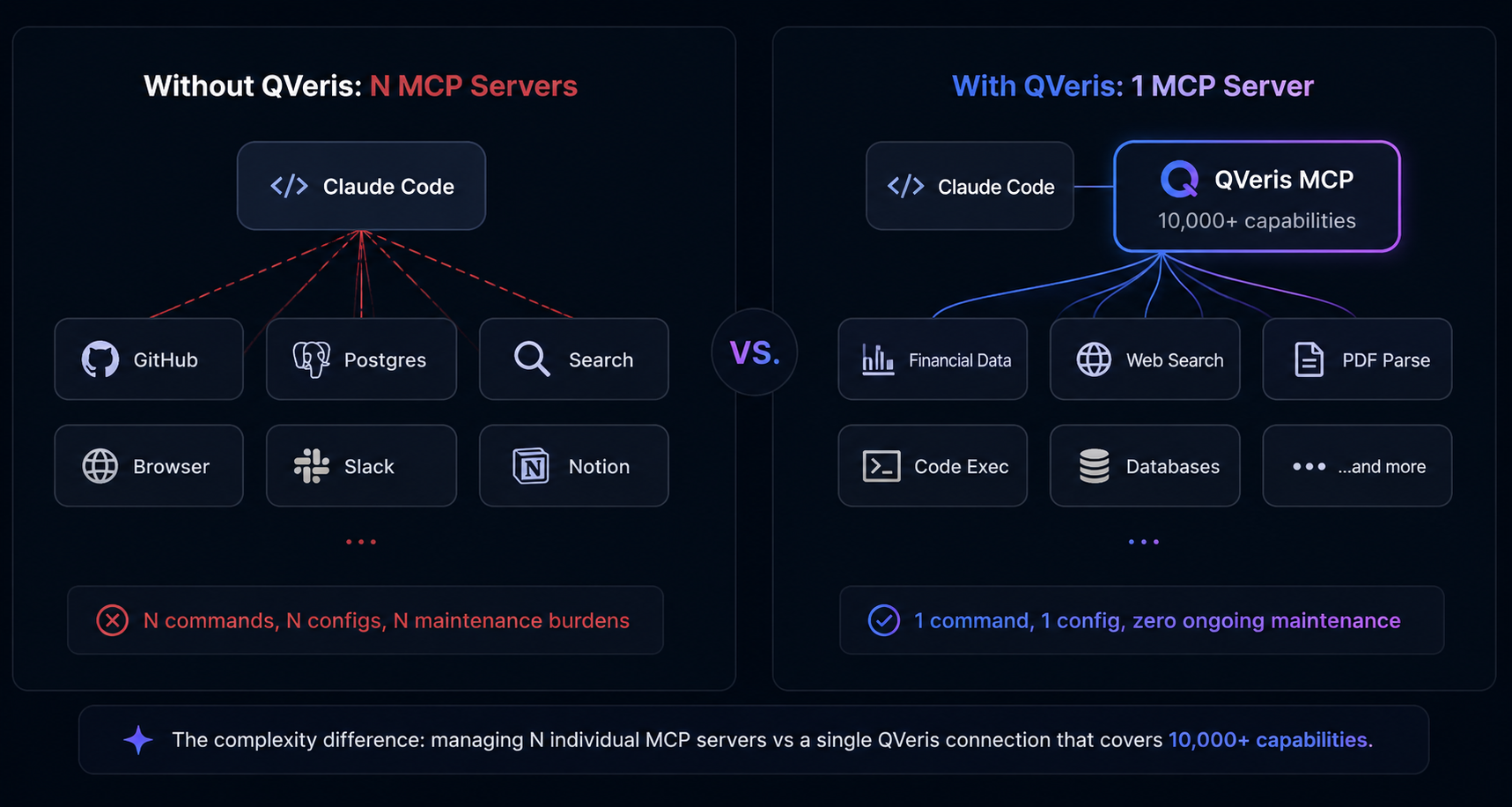
- Solution: The claude mcp add command makes adding servers straightforward. For broad capability access, a single intelligent MCP server like QVeris replaces 10+ individual servers with one connection and 10,000+ capabilities[1].
- Result: This guide covers MCP fundamentals, step-by-step server setup, the best MCP servers for Claude Code in 2026, troubleshooting common issues, and how QVeris simplifies the entire MCP setup process.
How do I add MCP servers to Claude Code?
Run claude mcp add <name> -s user -- <command> in your terminal. For example: claude mcp add github -- npx @modelcontextprotocol/server-github. Verify with claude mcp list. Each MCP server gives Claude Code access to specific tools and data sources — GitHub repos, databases, search engines, and more[2]. For 10,000+ capabilities in one command, install QVeris: claude mcp add qveris -s user -- npx @qverisai/mcp[1].
What Is MCP (Model Context Protocol)?
The Model Context Protocol (MCP) is an open standard introduced by Anthropic in November 2024 that defines how AI agents communicate with external tools, data sources, and services[3]. Think of it as USB-C for AI — one protocol that any MCP-compatible client (Claude Code, Claude Desktop, Cursor, VS Code, Replit) uses to connect to any MCP-compatible server.
As of mid-2026, MCP is adopted by every major AI platform: Anthropic Claude, OpenAI ChatGPT, Google Gemini, Microsoft Copilot, and 500+ other clients. The ecosystem includes 10,000+ active MCP servers covering categories from code repositories and databases to search engines, financial data, and productivity tools[3][4].
How MCP Solves the N×M Integration Problem
Without a standard protocol, every AI agent needs custom integration code for every tool it wants to call. If your organization runs 5 AI assistants and 20 tools, that is 100 separate integrations to build and maintain. MCP collapses this complexity: every agent speaks MCP, every tool speaks MCP, and one integration connects them all[3].
For Claude Code users, MCP means your coding agent can access GitHub repositories, query databases, search the web, read documentation, and call APIs — all through a unified protocol. Each MCP server adds a category of capabilities[2].
MCP in 2026: The Standard for AI Tool Calling
MCP reached critical mass in early 2026 when Anthropic donated the protocol to the Linux Foundation's Agentic AI Foundation[3]. Key adoption numbers:
- 97 million monthly MCP SDK downloads as of May 2026[3]
- 10,000+ active MCP servers available publicly[4]
- 500+ MCP-compatible clients (Claude Code, ChatGPT, Gemini, Cursor, VS Code)[3]
- 42 MCP gateway and management projects[5]
For Claude Code users, this means the question is no longer "should I use MCP?" but "which MCP servers should I connect to maximize my coding agent's capabilities?"
Getting Started: How to Add MCP Servers to Claude Code
Anthropic made MCP server management straightforward with the claude mcp add command[2]. Here is how to set up your first server, verify it works, and understand the configuration options.
Prerequisites
- Node.js 18.0+ — Most MCP servers run on Node.js. Run
node --versionto check. Install from nodejs.org if needed. - Claude Code installed — You need the Claude Code CLI. Install via
npm install -g @anthropic-ai/claude-codeif not already set up. - API keys — Each MCP server may require its own API key (GitHub token, database credentials, etc.). Have these ready.
Step 1: Verify Node.js Installation
node --version
# Should return v18.0.0 or higher
If Node.js is not installed, download the latest LTS version from nodejs.org and run the installer. Node.js 18.0+ includes npx, which most MCP server packages use.
Step 2: Add an MCP Server via CLI (claude mcp add)
The claude mcp add command is the recommended way to add servers[2]. The syntax is:
claude mcp add <name> -s <scope> -- <command>

# Example: Add the GitHub MCP server
claude mcp add github -- npx @modelcontextprotocol/server-github

# Example: Add a database server
claude mcp add postgres -s project -- npx @anthropic-ai/mcp-server-postgres
Replace <name> with a descriptive label. The -s flag controls configuration scope (see below). Everything after -- is the command Claude Code runs to start the server.
Step 3: Verify with claude mcp list
claude mcp listThis command lists all configured MCP servers, their transport type (stdio or HTTP), and current status[2]. Each connected server appears with its name and the tools it exposes. If a server fails to start, claude mcp list shows an error state.
Transport Types: stdio vs HTTP vs SSE
Claude Code supports three transport mechanisms for MCP servers[3]:
- stdio (default) — The server runs as a child process of Claude Code. Fastest option, no network overhead. Best for local tools and databases.
- HTTP — Connect to a remote MCP server via HTTP. Use
--transport httpflag. Ideal for shared team services and cloud-hosted tools. - SSE (Server-Sent Events) — Streaming transport for real-time data. Less common but useful for live data feeds.
Transport choice matters for latency and deployment flexibility. For most Claude Code users, stdio is the right default.
Configuration Scope: User vs Project vs Local
The -s flag controls where the configuration is saved[2]:
-s user— Saves to~/.claude.json(global). Available across all projects. Best for tools you use everywhere.-s project— Saves to.mcp.jsonin the current project directory. Shared with team members via version control.- Default (omit
-s) — Saves locally, not shared. Best for personal experimentation.
You can also edit JSON configuration files directly: .mcp.json for project scope, ~/.claude.json for user scope. This is useful when you need to configure multiple servers at once or version-control your setup.
Best MCP Servers for Claude Code in 2026
The MCP ecosystem includes 10,000+ servers[4]. Here are the most useful ones for Claude Code development workflows, organized by category:
Essential Servers
GitHub MCP
Manage repos, review PRs, create issues, browse code. Essential for any Claude Code user working with GitHub-hosted projects.
Playwright MCP
Browser automation — Claude Code can navigate pages, take screenshots, fill forms, and test web apps[4]. Browserbase-hosted version available.
Context7 (Upstash)
Up-to-date library documentation. Claude Code fetches the latest docs for any npm/PyPI package, reducing hallucination on API details.
Brave Search MCP
Web search directly from Claude Code. Useful for finding documentation, troubleshooting errors, and researching libraries.
Database Servers
Postgres MCP Pro
Query Postgres databases, inspect schemas, run migrations. Supports read-only mode for production safety.
MongoDB MCP
Query MongoDB collections, run aggregations, inspect document schemas. Supports Atlas and self-hosted instances.
Supabase MCP
Manage Supabase projects — query Postgres, manage auth, interact with storage buckets, and configure Edge Functions.
SQLite MCP
Lightweight local database access. No server setup needed — works directly with .db files in your project.
Productivity Servers
Slack MCP
Send messages, read channels, search history. Claude Code can post deployment updates or retrieve context from conversations.
Notion MCP
Read and write Notion pages, databases, and comments. Useful for project documentation workflows.
Google Drive MCP
Search and read Google Docs, Sheets, and Drive files. Claude Code can analyze spreadsheet data or reference design docs.
Jira MCP
Create and update tickets, search issues, view sprint boards. Claude Code can link code changes to Jira tasks.
QVeris: The All-in-One Intelligent MCP Server (10,000+ Capabilities)
Instead of installing and maintaining 10+ separate MCP servers, QVeris provides a single MCP connection that unlocks 10,000+ capabilities across 15+ categories[1]. One claude mcp add qveris command replaces the entire list above — and adds capabilities no single MCP server can provide, including financial data, advanced search, PDF parsing, sandboxed code execution, and more.
If you want one MCP server that covers everything — from web search to financial data to database queries — QVeris is the simplest path. The next section explains why.
Why QVeris Is the Smartest MCP Server for Claude Code
QVeris redefines what an MCP server can be. Traditional MCP servers connect to a single tool or data source. QVeris connects to 10,000+ capabilities across 15+ categories[1] — and adds a discovery layer that helps Claude Code find the right tool for each task.
One Server, Unlimited Capabilities
Without QVeris, adding capabilities to Claude Code means adding more MCP servers. Need GitHub access? Install a server. Need Postgres? Another server. Need web search? A third server. Before long, you have 10+ servers to configure, maintain, and troubleshoot.
QVeris replaces this with one command: claude mcp add qveris -s user -- npx @qverisai/mcp. One server, 10,000+ capabilities[1]. Financial data, web search, PDF parsing, blockchain queries, academic research, weather, maps, social media — all available through a single MCP connection.
The practical impact: A team that would normally manage 8-12 individual MCP servers can operate with one QVeris connection covering all those use cases — plus capabilities no individual server provides.
Natural Language Tool Discovery (Discover → Inspect → Call)
QVeris's three-step workflow is fundamentally different from traditional MCP servers[1]:
- Discover (free): Claude Code describes what it needs in natural language — "find S&P 500 data" — and QVeris returns matching capabilities with metadata.
- Inspect (free): Before calling any capability, Claude Code inspects its cost, average latency, success rate, and full parameter schema. No blind calls.
- Call (pay-per-use): Sandbox execution returning structured JSON. Full audit trail with session tracking.
This means Claude Code does not need to know the exact tool name or endpoint. It describes the goal, QVeris finds the right capability, inspects it, and executes. Learn more about MCP gateways →
Financial Data Deep Coverage
QVeris provides depth in six financial domains: quantitative trading, macro and fixed income, risk and compliance, investment research, crypto and digital assets, and alternative signals[1]. No other MCP server — including GitHub, Postgres, or any individual tool — offers financial data specialization.
For Claude Code users building financial analysis agents, this means one MCP connection gives access to real-time market data, historical prices, corporate filings, earnings call transcripts, and more. Explore our financial MCP server list →
Pre-Call Cost and Performance Preview
Before spending credits, QVeris lets Claude Code inspect any capability for free — checking expected cost in credits, average latency, and historical success rate[1]. Traditional MCP servers offer no equivalent: Claude Code calls the tool and discovers problems only after burning credits or time.
Who this matters for: Teams running Claude Code in production, where every tool call has real costs. Pre-call inspection eliminates waste from misconfigured or underperforming tool calls.
How to Set Up QVeris MCP Server (Step-by-Step)
Visit qveris.ai and sign up for a free account. Your API key (format: sk-xxx) is available in the dashboard immediately. No credit card required.
claude mcp add qveris -s user -- npx @qverisai/mcpRunning this command registers QVeris as a user-scoped MCP server[2]. The -s user flag makes it available across all your Claude Code projects. QVeris is also available for Cursor (.cursor/mcp.json) and Claude Desktop (claude_desktop_config.json) — the same @qverisai/mcp npm package works everywhere.
Set the QVERIS_API_KEY environment variable:
claude mcp add qveris -s user -e QVERIS_API_KEY=sk-xxx -- npx @qverisai/mcpAlternatively, add it to your shell profile (~/.zshrc or ~/.bashrc): export QVERIS_API_KEY=sk-xxx. Optional environment variables: QVERIS_REGION and QVERIS_BASE_URL.
In Claude Code, type: "What is the latest S&P 500 performance and top movers today?"
Claude Code automatically uses QVeris's discover → inspect → call workflow to find the right financial capability, inspect its cost and latency, execute the call, and return structured data[1]. No manual tool selection needed.
Try other queries: "Search the web for the latest AI news", "Parse this PDF and summarize it", "Get real-time Bitcoin price".
QVeris vs Other MCP Servers: What You Get
Here is how QVeris compares against individual MCP servers across key dimensions for Claude Code users:
| Dimension | QVeris MCP Server | Individual MCP Servers |
|---|---|---|
| Number of MCP configs | 1 | N (one per tool) |
| Capability coverage | 10,000+ across 15 categories[1] | 1 tool per server |
| Tool discovery | Natural language (Discover API) | Pre-configured, each tool needs a dedicated command |
| Pre-call inspection | Cost / latency / success rate preview | Not available |
| Financial data | 6 domains deep coverage[1] | Not available from standard servers |
| Web search | Built-in | Requires Brave Search MCP |
| PDF parsing | Built-in | Requires dedicated PDF MCP server |
| Code execution | Sandbox execution | Needs separate configuration |
| Maintenance | Zero (QVeris manages) | Each server updated individually |
| MCP Tool Search support | Built-in | Not available |
| CLI integration | Zero token overhead | Varies by server |
| Free tier | 1,000 + 100/day credits[6] | Most are free / open-source |
| Claude Code + Cursor + Desktop | Single config, 3 platforms | Config per platform |
The trade-off: Individual MCP servers are free and open-source, giving you full control. QVeris saves significant setup and maintenance time by consolidating 10+ servers into one — plus adds capabilities (financial data, pre-call inspection, natural language discovery) that no individual server provides[1]. If you need only one specific tool, a dedicated server may be simpler. If you need broad capability access, QVeris eliminates the complexity of managing a growing collection of MCP servers.
Troubleshooting Common Claude Code MCP Issues
Even with straightforward setup, MCP server configuration can encounter issues. Here are the most common problems and their solutions[2]:
Your .mcp.json or claude_desktop_config.json file has a syntax error. Validate your JSON with a linter. Common causes: trailing commas, missing quotes around keys, or unescaped special characters in command strings.
Run claude mcp list to check server status. If a server shows as disconnected, the command may have failed to start. Check that the npm package is installed and the command is correct. Try reinstalling: claude mcp add <name> -s user -- <command>.
cmd /c wrapper
On Windows, some MCP servers require a cmd /c wrapper: claude mcp add <name> -- cmd /c npx @package/name. Without the wrapper, npx may not execute correctly in the Windows environment.
If your MCP server needs an API key but cannot find it, ensure you passed it via the -e flag: claude mcp add <name> -s user -e API_KEY=xxx -- <command>. Alternatively, add the variable to your shell profile and restart your terminal.
If npx throws EACCES errors, you may need to install Node.js via a version manager (nvm, fnm) rather than a system package manager. Alternatively, install the package globally: npm install -g @package/name, then reference it directly without npx.
Still stuck? The Claude Code MCP error messages have improved significantly in 2026 — most issues include a suggested fix in the error output. If a server consistently fails, check the server's GitHub issues page for known problems with your Node.js version or platform.
Frequently Asked Questions About Claude Code MCP
claude mcp add command in your terminal[2]. For example: claude mcp add qveris -s user -- npx @qverisai/mcp. You can also configure MCP servers by editing .mcp.json (project scope) or ~/.claude.json (global scope).discover tool when it needs external capabilities[1]. Ask natural language questions like "Find me stock market data for Tesla" or "Search for a weather API" — Claude will discover, inspect, and call the right tool automatically.claude_desktop_config.json. For Cursor, configure it in Settings → MCP Servers. The same @qverisai/mcp package works everywhere.Conclusion: Supercharge Claude Code with MCP
MCP transforms Claude Code from a capable coding agent into a connected development platform that can access GitHub, databases, search engines, financial data, and thousands of other capabilities[3]. The setup is straightforward: one claude mcp add command per server, verify with claude mcp list, and you are ready.
For teams that need breadth, QVeris provides the simplest path: one MCP server, 10,000+ capabilities[1], natural language discovery, pre-call inspection, and zero ongoing maintenance. Start with the free tier — 1,000 credits on signup plus 100 daily — to explore capabilities before committing[6].
Recommendation: Start with QVeris for broad capability coverage, then add specialized servers (GitHub, Postgres, Playwright) only when you need something QVeris does not cover. Most teams find QVeris handles 90%+ of their MCP needs with a single connection.
Add QVeris to Claude Code — Free Tier Available
10,000+ capabilities through one MCP connection. Free discovery, pay-per-call execution. No credit card required.
Get Started Free → View Pricing →